Capacitive touchscreens offer high responsiveness and multi-touch, ideal for sleek applications, while resistive screens are versatile and precise, perfect for rugged or glove-friendly environments.
When choosing a
touchscreen for your application, understanding the differences between capacitive and resistive touch technologies is essential. Here's a concise comparison:
Capacitive touchscreens operate by detecting changes in capacitance, a property of electric fields, caused by the touch of a conductive object like a finger. A transparent conductive layer is applied to the screen, and when touched, the screen senses the minute electrical charge from the contact point.
Key Features and Advantages
-
Highly Responsive and Intuitive:
- Capacitive screens are incredibly sensitive and require only a light touch to respond. This makes them ideal for applications demanding quick and fluid interactions, such as smartphones or ATMs.
-
Multi-Touch Functionality:
- They support gestures like pinch-to-zoom, rotation, and multi-finger swiping. This capability enhances user experiences in devices like tablets and professional-grade industrial interfaces.
-
Optical Clarity:
- The absence of multiple layers in capacitive technology ensures excellent screen visibility with higher brightness and color vibrancy. This is crucial in environments where display quality significantly affects usability.
-
Durability:
- The outer layer is typically made of toughened glass, offering resistance to scratches, smudges, and everyday wear and tear.
Drawbacks
- Higher Cost:
- The technology is generally more expensive due to the advanced materials and processes involved.
- Glove or Stylus Incompatibility:
- Standard capacitive screens often fail to register inputs from non-conductive objects unless equipped with special enhancements.
Applications
- Smartphones and tablets.
- High-end industrial devices requiring sleek, responsive interfaces.
- Consumer electronics like smart home control panels.
- Interactive kiosks in controlled environments.
Resistive touchscreens rely on physical pressure to register input. When the user presses the screen, two conductive layers within the screen come into contact, completing an electrical circuit at the touchpoint.
Key Features and Advantages
-
Precision Input:
- Unlike capacitive screens, resistive technology allows for pinpoint accuracy, making it perfect for applications where detailed input, such as handwriting or fine-tuned selections, is essential.
-
Input Versatility:
- These screens work seamlessly with any input device, including gloves, styluses, and even blunt objects. This versatility makes them invaluable in industrial, medical, and outdoor settings.
-
Cost Efficiency:
- Resistive screens are often more affordable to produce, making them an economical choice for applications where cost is a significant consideration.
-
Reliable in Harsh Conditions:
- Resistive touchscreens function well in extreme environments, including wet or dusty conditions, where capacitive screens might struggle.
Drawbacks
- Limited Multi-Touch Capability:
- They generally only support single-point input, restricting their use in applications demanding complex gestures.
- Reduced Visibility:
- The additional layers in resistive screens can slightly reduce optical clarity and brightness, particularly under bright light.
Applications
- Medical devices like diagnostic equipment or infusion pumps.
- Industrial machinery interfaces, especially in rugged or dusty environments.
- Outdoor applications such as navigation systems or ticketing machines.
- Budget-sensitive consumer electronics.
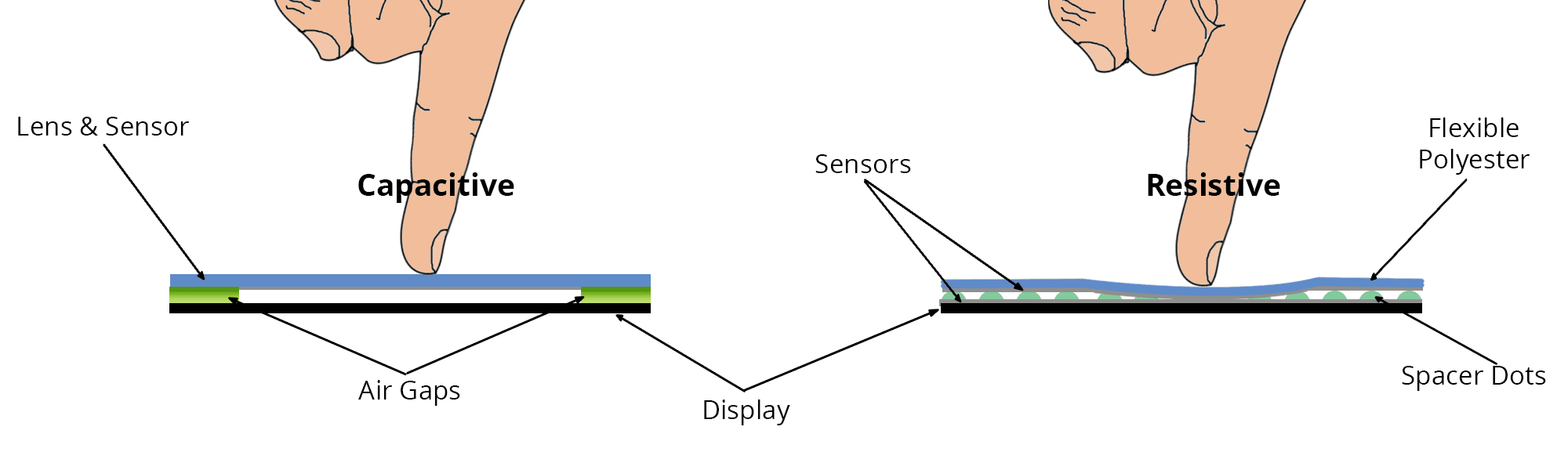
A Side-by-Side Comparison
|
Feature
|
Capacitive
|
Resistive
|
|
Input Method
|
Conductive touch (e.g., finger)
|
Any object (finger, glove, stylus)
|
|
Touch Sensitivity
|
Highly sensitive
|
Requires pressure
|
|
Multi-Touch
|
Yes
|
Limited or none
|
|
Optical Clarity
|
Excellent
|
Good but can be affected by layers
|
|
Durability
|
Scratch-resistant glass
|
Less durable; prone to wear
|
|
Environmental Suitability
|
Controlled environments
|
Rugged, outdoor, and industrial use
|
|
Cost
|
Higher
|
Lower
|
How to Choose Between Capacitive and Resistive Touchscreens
When deciding which technology suits your needs, consider the following factors:
-
Environment:
- If your application operates in clean, controlled environments, such as offices or retail stores, capacitive touchscreens are ideal due to their sleek and intuitive operation.
- For outdoor, industrial, or medical settings, where gloves or styluses are frequently used, resistive touchscreens are more practical.
-
Budget Constraints:
- Capacitive technology often involves higher costs. If budget constraints are a significant factor, resistive screens might offer a more affordable solution without compromising functionality.
-
Display Quality:
- Prioritize capacitive screens for devices where optical clarity and brightness are critical, as they deliver superior visual performance.
-
Touch Interactions:
- For multi-touch gestures and dynamic interfaces, capacitive touchscreens are the way to go.
- However, for precision input with styluses or gloves, resistive technology is the better choice.
Conclusion
Both capacitive and resistive touchscreens bring unique advantages to the table. Capacitive screens shine in modern, consumer-focused applications with their sleek and intuitive interfaces, while resistive screens excel in rugged, industrial, and precision-driven environments. Selecting the right technology depends on the specific demands of your project, including budget, environment, and input preferences.
For further assistance in choosing the perfect touchscreen solution, feel free to get in touch with our team of experts!


