How to choose the right touch screen LCD screen by considering size, resolution, touch technology, sensitivity, and durability?
Choosing the Right Touch Screen LCD Screen
Finding the right touch screen LCD screen can be overwhelming with the wide range of options available. Whether for a smartphone, tablet, industrial equipment, or a retail kiosk, selecting the right display requires a good understanding of features, specifications, and application needs.

What Factors Should You Consider When Choosing a Touch Screen LCD Screen?
Display Size and Resolution
How do screen size and resolution impact usability?
Screen size and resolution determine how content appears on a display. A higher resolution ensures sharper images, while the right screen size improves usability in various applications.
![Featured Image]
What are the common screen sizes and resolutions?
Most consumer devices feature screens between 5 and 15 inches, while industrial or commercial applications may use sizes ranging from 7 to over 32 inches. Common resolutions include:
- 720p (HD) – Suitable for budget-friendly applications
- 1080p (Full HD) – Ideal for mid-range devices
- 1440p (QHD) and 4K UHD – Common in high-end tablets and monitors
What should you consider when selecting size and resolution?
- Application – Larger displays suit kiosks and industrial systems, while smaller screens are better for handheld devices.
- Viewing Distance – Higher resolutions work best for close-up use, while lower resolutions suffice for distant viewing.
- Power Consumption – Higher resolutions require more energy, affecting battery life in portable devices.
What Are the Different Types of Touch Screen Technologies?
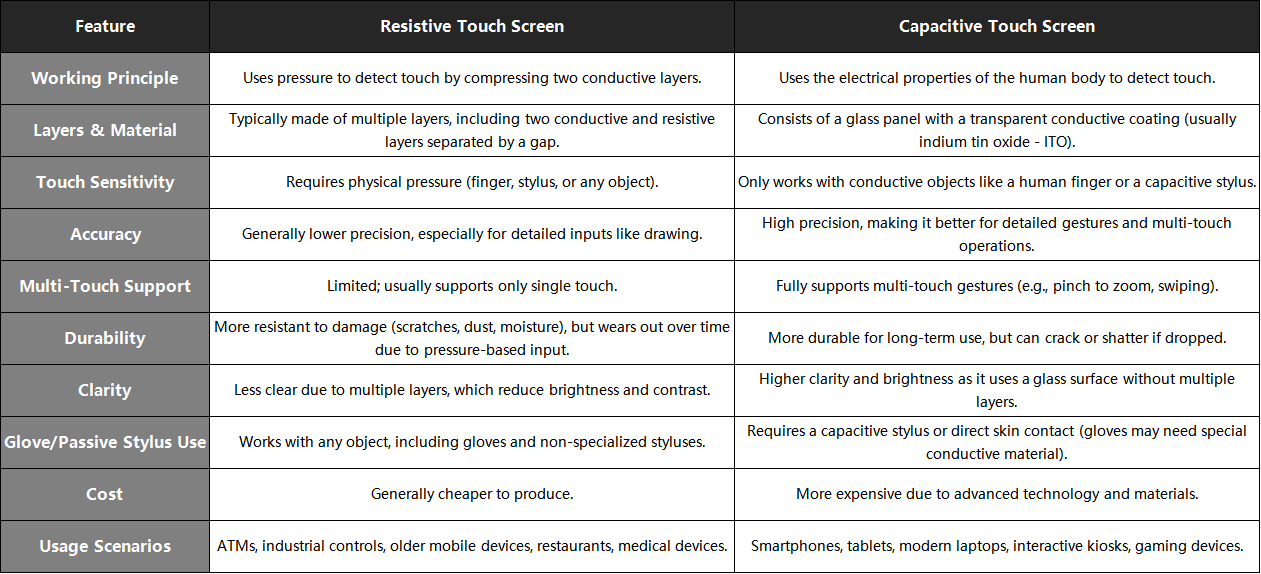
Resistive vs. Capacitive Screens
How do resistive and capacitive touch screens differ?
Touch screens operate using different technologies, with resistive and capacitive being the most common.
![Featured Image]
What are the key characteristics of each?
| Feature |
Resistive Touch |
Capacitive Touch |
| Input Method |
Pressure-based (Stylus, Finger) |
Conductive touch (Finger, Some Styluses) |
| Durability |
More resistant to dust and moisture |
More sensitive but vulnerable to scratches |
| Clarity |
Less transparent due to multiple layers |
Higher clarity and brightness |
| Cost |
Generally more affordable |
Higher cost due to technology |
Which one should you choose?
- Resistive screens work well in industrial or medical environments where gloves are commonly used.
- Capacitive screens offer better responsiveness and clarity, making them ideal for smartphones, tablets, and interactive kiosks.
How Does Touch Screen Sensitivity Affect Performance?
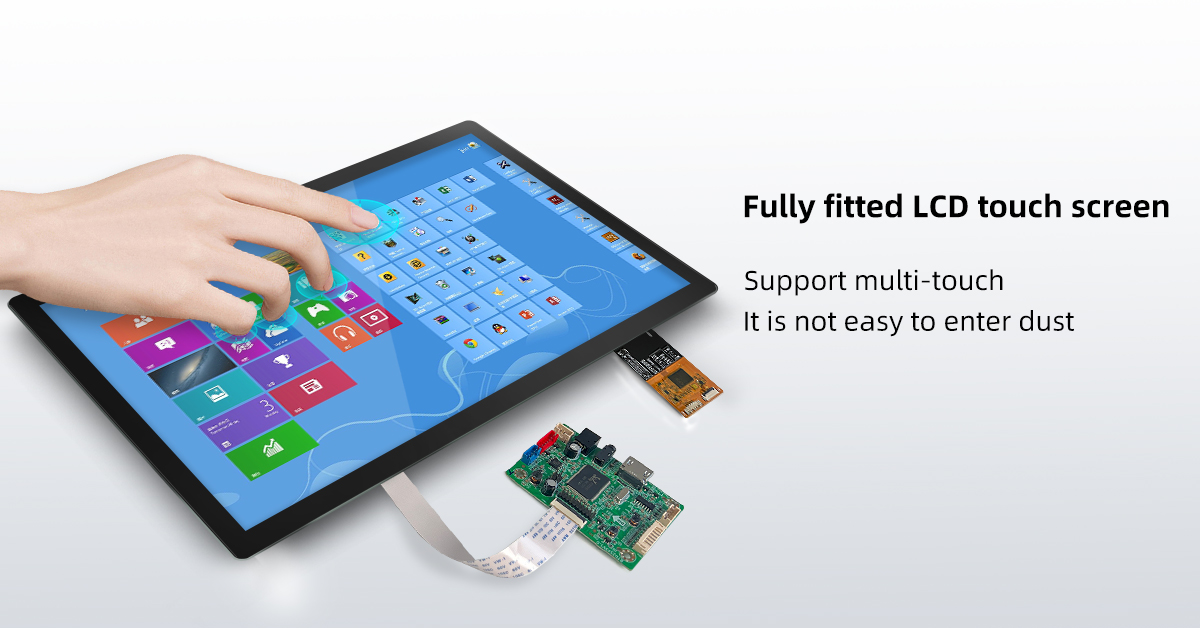
Response Time and Multi-Touch Capabilities
What role does sensitivity play in user experience?
A screen's ability to register touch input accurately affects responsiveness, speed, and ease of use.
![Featured Image]
What factors influence sensitivity?
- Touch Technology – Capacitive screens are more sensitive than resistive ones.
- Multi-Touch Support – Enables gestures like pinch-to-zoom and multi-finger scrolling.
- Response Time – Faster response improves fluidity, especially in gaming or interactive applications.
How can you test touch sensitivity?
When evaluating a touch screen, check for:
- Lag-free operation – Touch response should be immediate.
- Accuracy – Input should register exactly where you touch.
- Pressure sensitivity – Some screens recognize different pressure levels for varied input.
What Other Features Should You Look for in a Touch Screen LCD Screen?

Brightness, Viewing Angles, and Durability
Why are brightness and viewing angles important?
Different environments require different levels of brightness and screen visibility.
![Featured Image]
What factors affect display performance?
- Brightness (nits) – Higher brightness is necessary for outdoor use (above 500 nits).
- Viewing Angles – IPS panels provide better color accuracy from different angles.
- Contrast Ratio – A higher contrast ratio improves visibility in bright and dark conditions.
How do durability and protection affect longevity?
- Scratch Resistance – Look for Gorilla Glass or similar protective coatings.
- Water and Dust Resistance – IP-rated screens withstand harsh environments.
- Anti-Glare Coating – Reduces reflections for better visibility outdoors.
Final Thoughts
Selecting the right touch screen LCD screen requires careful consideration of size, resolution, touch sensitivity, and durability. Whether for everyday use or specialized applications, understanding these features helps in making an informed choice.

